

Private AI Deployment
Private AI Deployment: Run AI Inside Your Own Environment
Use AI on your sensitive data without sending it to a shared public service. Fortiv deploys AI in your private cloud or on your own infrastructure, with controlled access and audit logs, connected to your internal systems and governed by your rules.
Where the AI runs
Your systems
- ERP, CRM and document stores
- The sign-in and roles you already use
AI inside your boundary
- Private cloud tenancy or on-premise servers
- Access follows your roles
- Requests and approvals logged
Stays with you
- Documents and outputs inside the boundary you define
- Audit logs you can review
Illustrative. The boundary, models and controls are agreed with your IT and security teams.
A request arrives
ERP, CRM and document stores
The AI reads it
Private cloud tenancy or on-premise servers
The AI drafts the action
Access follows your roles
A person approves
Identity and access follow your existing sign-in and role setup, and approvals stay with named people.
The operational problem
Why companies choose private AI
Public AI tools are fast to try, but they raise questions that IT, legal and security teams have to answer. Some data can't leave your control: vendor rates, product formulations, customer records, financials, contracts. Private AI deployment keeps processing and data inside a boundary you define.
Where it breaks down
- 01Where does the data go? Prompts, documents and outputs may be processed or stored outside your environment.
- 02Who can see it? Without clear access controls, staff can paste sensitive material into tools you don't manage.
- 03Can we prove what happened? Regulated and audited businesses need a record of what AI read, produced and did.
- 04Do contracts and regulations allow it? Customer contracts, sector rules and India's data protection law can limit where data may be processed.
- 05Does it connect to our systems? An AI that can't reach your ERP, document stores and databases stays a toy.
Deployment options
Private cloud vs on-premise AI: which fits your data?
There is no single right answer. The best option depends on your data rules, existing infrastructure and in-house IT capacity.
| Private cloud AI | On-premise AI | |
|---|---|---|
| Where AI runs | In a cloud environment dedicated to you, such as your own cloud account or a virtual private network | On servers you own, in your facility |
| Data boundary | Inside your cloud tenancy, with network and access controls you set | Inside your own network |
| Setup speed | Usually faster, since no servers need to be bought | Slower, because servers must be sourced and installed |
| Upfront cost | Lower | Higher, mainly for servers |
| Ongoing cost | Usage-based infrastructure costs | Server upkeep, power and IT staff time |
| Scaling | Easy to scale up or down | Limited by the servers you buy |
| Control | High, within your cloud provider's model | Highest |
| Best for | Companies already on cloud that need data kept inside their own tenancy | Organisations with strict data-residency or air-gap requirements, or existing data-centre capacity |
Some organisations combine the two: sensitive workloads stay in the most controlled environment while lower-risk tasks use other services. To decide, classify your data, check contractual and regulatory limits on where it may be processed, look at the infrastructure you already have, and compare setup, running costs and the effort of keeping models and software up to date. We confirm what fits during discovery.
How it works
How a private AI deployment runs, from discovery to a live system.
- 01
Discovery
We map your use cases, data classes, security requirements and existing infrastructure, and agree the deployment model.
- 02
Design and security review
We design the architecture with your IT and security teams, covering network boundaries, access, logging and approvals.
- 03
Pilot
We deploy one use case in the agreed environment, measure it against a baseline and review the results with your team.
- 04
Rollout and support
We extend to more workflows and teams, train users, set up monitoring and help keep models, software and rules up to date.
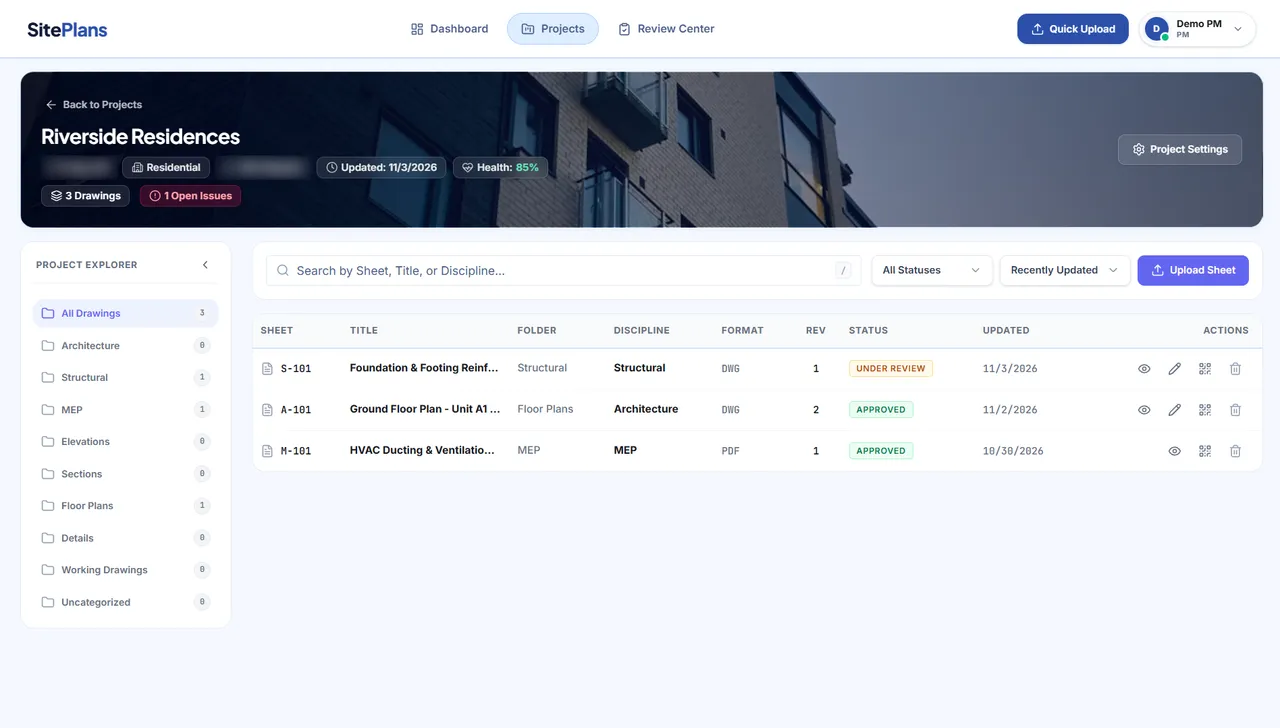
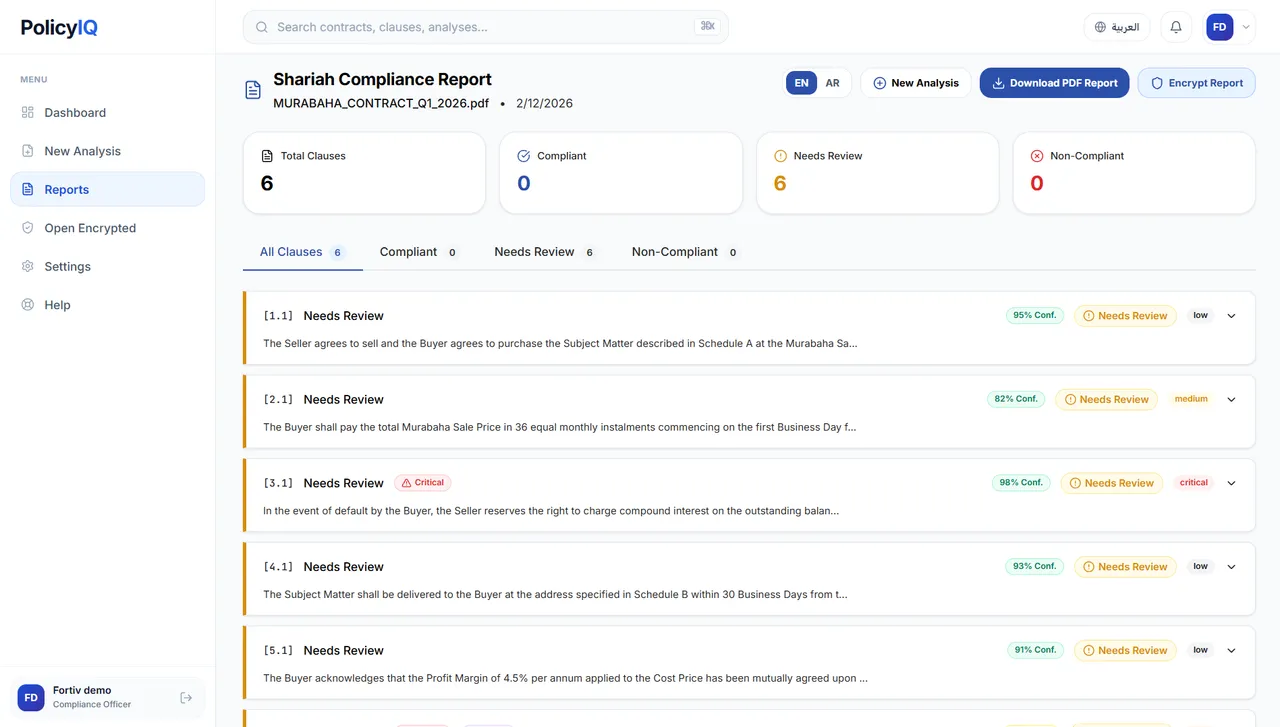
From the portfolio
What it looks like in a client project.
Screens from systems we built and run. Details are anonymised.
Capabilities
Data access and governance you set.
Private deployment is only as safe as the rules around it. We set these up with your IT, security and compliance teams.
Role-based access
The AI sees only the data a user or service account is allowed to see. Permissions follow your existing roles.
Data boundaries
You decide which systems, folders and databases the AI may read, and which it may never touch.
Approvals
Actions that change records, spend money or contact customers need a named approver or limits you set.
Audit logs
Every request, retrieval, output and approval is logged, so you can review what happened and when.
Data use and retention
How long prompts, outputs and logs are kept, how they are deleted, and whether anything is used to improve a model are agreed with your team before work starts.
Personal data
Where records include personal data, India's Digital Personal Data Protection Act applies. We design access, retention and logging around your obligations. This is general guidance, not legal advice.
What we deliver
Scope is agreed per engagement. These are the components a typical build includes.
- Deployment design agreed with your IT and security teams
- Private cloud or on-premise environment set-up
- Role-based access and data-boundary configuration
- Audit logging and approval steps
- Integration with your internal systems
- User training and monitoring set-up
Integration & implementation
Connected to your internal systems, not rebuilt around them.
A private AI layer adds AI to your environment without rebuilding it. Connections run through APIs, database access or scheduled files, whichever your systems support.
Your systems
- SAP
- Microsoft 365
- Google Workspace
- Salesforce
- HubSpot
- Zoho CRM
- PostgreSQL
Fortiv layer
- Private cloud tenancy or on-premise servers
- Access follows your roles
- Requests and approvals logged
Low-confidence cases go to a person
What comes back
- Documents and outputs inside the boundary you define
- Audit logs you can review
Systems are examples, not a fixed list.
Access and approvals
Identity and access follow your existing sign-in and role setup, and approvals stay with named people. Which identity providers and monitoring tools connect is confirmed during discovery.
Security and data handling
Access follows your existing permissions, actions are logged, and hosting, model providers and data retention are agreed with your security team — we work within your requirements. How we approach security
Industry applications
Where it applies.
Typical applications. Each is scoped against the workflows and systems of the organisation in question.
Manufacturing
Illustrative: supplier documents such as certificates of analysis and invoices are read inside the company's own cloud, matched against ERP records and sent to reviewers.
Industry overview
Financial services
Illustrative: an assistant answers questions from internal reports and policies, sees only what each user's role allows and logs every answer.
Industry overview
Regulated businesses
Illustrative: AI runs on-premise, connected only to approved internal systems, with approval before any record is changed.
Measurement
What we measure.
We record a baseline for each of these before go-live and report against it. We don't quote results before we have seen your workflow and data.
Data flows documented
Every place data goes, agreed with IT and security before go-live.
Access reviewed
Who and what can read each source, checked against your role setup.
Log completeness
Share of requests, retrievals and approvals that appear in the audit log.
Pilot against baseline
The first use case measured against today's numbers, agreed before it starts.
It is running AI in an environment you own or control, such as your private cloud or on-premise servers, so your data is processed inside a boundary you define rather than on a shared public service.
Neither is better in every case. Private cloud is faster to set up and easier to scale. On-premise gives you the most control and suits strict residency or air-gap needs. The right choice depends on your data rules, infrastructure and IT capacity.
In a private deployment, processing happens inside the environment you choose. We agree the full data flow with your IT and security teams before anything goes live, and we document any external service that is used.
Whether a self-hosted model is the right choice depends on the task, the data and your hardware. We assess that during discovery, and say so plainly when a model hosted inside your own cloud tenancy is the better fit.
The AI works under the permissions you assign and follows your role setup. You choose which systems it may read, which actions need approval, and every step is logged.
What is retained, for how long, and whether anything is used to improve a model are agreed with your team before work starts. We put the answer in the deployment design so your security team can review it.
We connect to ERPs such as SAP, document stores, CRMs and databases through APIs, database access or scheduled files. We confirm the method for your systems during discovery.
It depends on the models and the number of users. We size the requirement during discovery, and a private cloud option avoids buying hardware up front.
Keeping processing inside your own environment, with access controls, audit logs and defined retention, makes it easier to meet your obligations. Compliance still depends on how you collect consent, handle data and respond to requests. This is general guidance, not legal advice.
It can cost more to set up, but the comparison should include the value of data control, access governance and integration. Private cloud usually has a lower upfront cost than on-premise. We give you a clear estimate after discovery.
It depends on the environment, the number of integrations and your security review process. We give you a realistic plan after discovery rather than a number up front.
Integration & delivery
Related solutions
Further reading
- Use case · Chemical ManufacturingAI Solvent Recovery & Distillation Optimization from Run Records and Utility Costs
- Use case · Automotive ManufacturingAI Torque & Fastening Audit Analytics for Automotive Assembly Lines
- Use case · Food & BeveragesClean-In-Place (CIP) Optimization AI: Sanitation Scheduling & Compliance Records for Food
- Business functionAI in Legal Operations & Practice Management
- Business functionAI in IT Operations (AIOps) & Incident Management
- Executive guideBuilding an AI-Native Manufacturing Enterprise