

AI CRM Integration
AI CRM integration that logs the call, updates the record and drafts the follow-up.
AI CRM integration connects generative AI to Salesforce, HubSpot or Dynamics: automated data entry, drafted outreach for review, and insight from every customer interaction.
What a CRM integration connects to
Inputs
- Call recordings and transcripts
- Email threads and meeting notes
The integration
- Summarises and categorises
- Updates fields and creates tasks
- Drafts follow-ups for a rep to review
Your CRM
- Salesforce, HubSpot, Dynamics 365 or Zoho CRM
Illustrative. Fields and objects follow your CRM setup.
A request arrives
Call recordings and transcripts
The AI reads it
Summarises and categorises
The AI drafts the action
Updates fields and creates tasks
A person approves
External communication always goes through a person: the AI drafts, a rep reviews and sends.
The operational problem
The CRM data-entry burden on sales teams
Sales and success teams spend a large part of their day logging notes, updating fields and drafting emails in the CRM. That administrative load leads to poor data hygiene, missed opportunities and skilled people doing clerical work.
Where it breaks down
- 01Sales reps spending their time on manual data entry instead of selling
- 02Incomplete or inaccurate CRM data due to human error
- 03Generic, untargeted outreach that fails to convert
How it works
How we integrate AI with your CRM, from architecture review to adoption.
- 01
CRM architecture review
Analyse your Salesforce, HubSpot or Dynamics setup, including custom objects.
- 02
AI pipeline development
Build middleware to parse call transcripts, emails and notes securely.
- 03
Workflow automation
Deploy automations that update fields and trigger follow-up tasks.
- 04
Enablement and training
Train your revenue teams to use the AI insights in their day-to-day work.
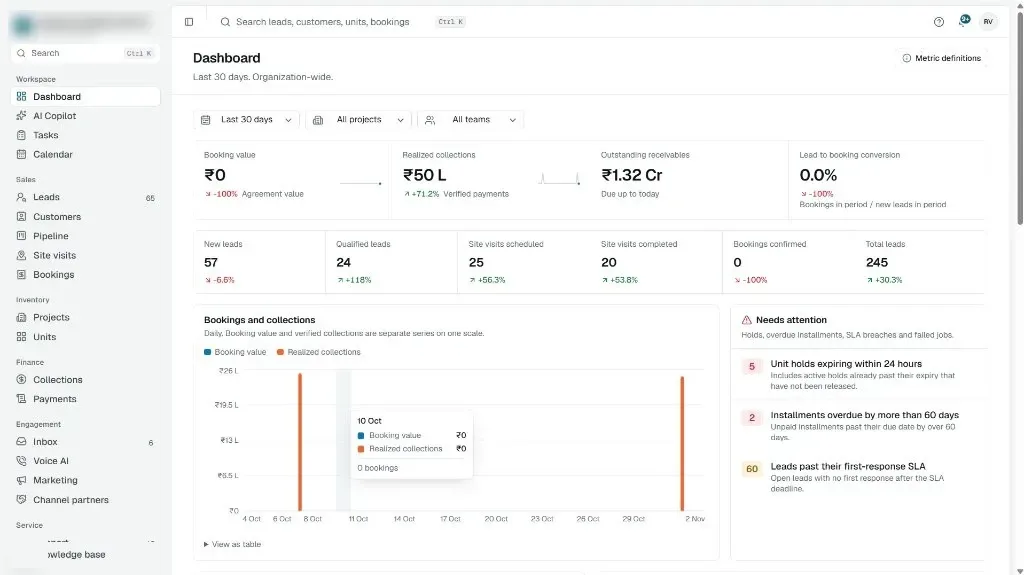
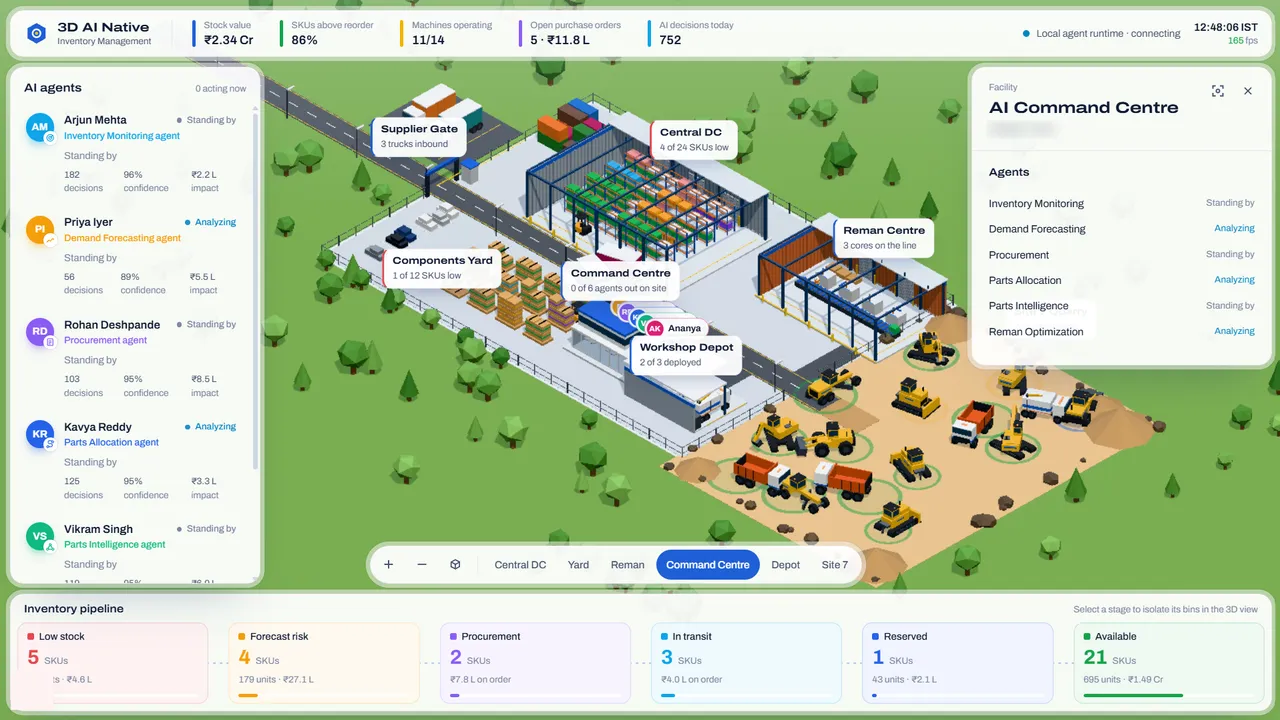
From the portfolio
What it looks like in a client project.
Screens from systems we built and run. Details are anonymised.
Capabilities
CRM automation for cleaner records and better follow-up.
Less manual data entry
Calls and emails logged, summarised and categorised automatically.
Personalised drafts
Emails drafted from CRM history and account context, for a rep to review and send.
Pipeline signals
Indicators of deal health and risk factors, surfaced before deals stall.
What we deliver
Scope is agreed per engagement. These are the components a typical build includes.
- Custom CRM API integrations
- Automated meeting note summarisation
- AI email drafting assistants
- Deal health prediction models
- Data hygiene automation scripts
Integration & implementation
Built into Salesforce, HubSpot and the CRM you already run.
We connect through the APIs, webhooks and identity controls you already have, and agree data handling with your team before anything is built.
Your systems
- Salesforce
- HubSpot
- Dynamics 365
- Zoho CRM
- Freshworks
- Gong
- Google Workspace
Fortiv layer
- Summarises and categorises
- Updates fields and creates tasks
- Drafts follow-ups for a rep to review
Low-confidence cases go to a person
What comes back
- Salesforce, HubSpot, Dynamics 365 or Zoho CRM
Systems are examples, not a fixed list.
Human review
External communication always goes through a person: the AI drafts, a rep reviews and sends. Field updates can be written directly or queued for approval, field by field.
Security and data handling
Access follows your existing permissions, actions are logged, and hosting, model providers and data retention are agreed with your security team — we work within your requirements. How we approach security
Industry applications
Where it applies.
Typical applications. Each is scoped against the workflows and systems of the organisation in question.
B2B technology
Capturing MEDDIC/BANT qualification data from recorded calls into Salesforce.
Financial services
Drafting personalised wealth-management outreach for adviser and compliance review.
Industry overview
Real estate
Updating buyer and tenant preferences from unstructured email conversations.
Industry overview
In practice
Measurement
What we measure.
We record a baseline for each of these before go-live and report against it. We don't quote results before we have seen your workflow and data.
Admin time per rep
Time spent logging and updating records, against baseline.
Record completeness
Share of opportunities with required fields filled and current.
Meeting prep time
Time to brief a rep before a call or meeting.
Reply rate
Response to drafted outreach compared with the previous approach.
AI CRM integration connects language models to your CRM so routine record-keeping happens automatically. Calls and emails are summarised and logged, fields are updated from the conversation, follow-up tasks are created and outreach is drafted from account history. Reps review the drafts and approve changes where you require it.
We work with Salesforce, Microsoft Dynamics 365, HubSpot, Zoho CRM and Freshworks, and can integrate AI with any CRM that has a usable API. We work with your existing objects, custom fields and permissions rather than asking you to change your CRM setup to fit the AI.
Built-in CRM AI features suit general tasks. A custom integration is useful when you need AI to work with your own custom objects, call recordings from other platforms, internal documents or industry-specific qualification rules. We review what your CRM licence already includes first, so you only build what it does not cover.
No. For external communication we keep a person in the loop. The AI drafts the email from CRM context and account history, and a rep always reviews it and clicks send. Internal updates, such as logging a call or creating a task, can be automatic or queued for approval, as you prefer.
No. We use enterprise API endpoints, for example Azure OpenAI or Anthropic's commercial API, whose terms exclude customer data from model training. Data retention is configured to match your policies, and the integration is designed to work within your data-protection obligations. Your sales data remains yours.
Cost depends on your CRM, the number of objects and data sources involved and how much review you want built in. We agree scope after a review of your CRM setup, then usually start with a pilot for one sales team, measured on admin time and record completeness against your current baseline.
Integration & delivery
Related solutions
- Private AI deploymentAI that runs in your private cloud or on your own infrastructure, with controlled data access, audit logs and links to your internal systems.
- Managed AI servicesManaged AI services for systems in production: monitoring, tuning and model upgrades, with response terms agreed per engagement.
- All solutions
Further reading
- Use case · Real EstateReal Estate Voice AI for Outbound Lead Outreach & Stale CRM Re-Activation
- Use case · Banking & FinanceWealth Advisory AI CRM: Client Relationship Insights & Meeting Prep
- Use case · Real EstateAI Lead Qualification for Real Estate: Inbound Leads & Showing Dispatch
- Business functionAI in Sales & Pipeline Acceleration
- Business functionAI in Customer Service & Support Operations
- Executive guideAI in Real Estate Sales & Lead Management